251101 使用golang text-template生成代码
书接上回源生?启动!
预览
通过三个表格
ActiveConf.xlsx
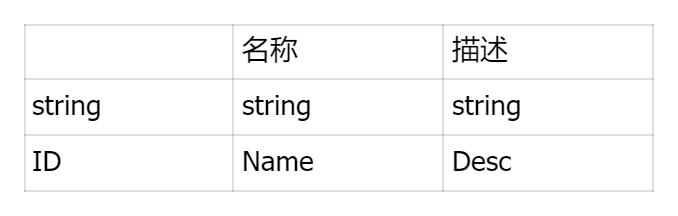
ActorBodyConf.xlsx

PassiveConf.xlsx
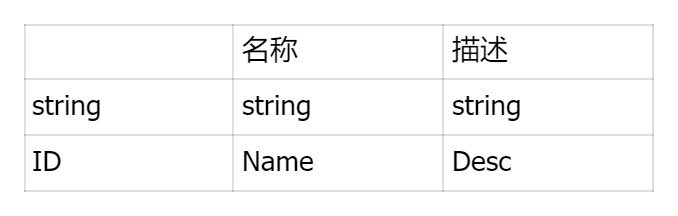
生成脚本CSV.g.cs
// 这份文件通过xlsx生成,请务必不要更改!!!!!

using Godot;
using System.Linq;
using System.Collections.Generic;

namespace Franken;

public partial class CSV
{
    public static void LoadAll()
    {
        ActiveConf.Load();
        ActorBodyPart.Load();
        PassiveConf.Load();
    }

    public partial class ActiveConf
    {
        static ActiveConf() => Load();

        public static List<ActiveConf> Data { get; private set; }

        private static Dictionary<string, ActiveConf> dict;
        public static ActiveConf Get(string key) =>
            dict.TryGetValue(key, out var value) ? value : null;

        private ActiveConf(string[] data)
        {
            ID = Util.GetString(data[0]);
            Name = Util.GetString(data[1]);
            Desc = Util.GetString(data[2]);
        }

        public string ID { get; set; }
        public string Name { get; set; }
        public string Desc { get; set; }

        public static void Load()
        {
            if (Data != null) return;
            Data = [];
            using var fa = FileAccess.Open("res://Assets/Config/CSV/ActiveConf.txt", FileAccess.ModeFlags.Read);
            while (!fa.EofReached()) {
                var tokens = fa.GetCsvLine("\t");
                if (tokens.All(string.IsNullOrEmpty)) continue;
                Data.Add(new(tokens));
            }
            dict = Data.ToDictionary(data => data.ID);
        }
    }

    public partial class ActorBodyPart
    {
        static ActorBodyPart() => Load();

        public static List<ActorBodyPart> Data { get; private set; }

        private static Dictionary<string, ActorBodyPart> dict;
        public static ActorBodyPart Get(string key) =>
            dict.TryGetValue(key, out var value) ? value : null;

        private ActorBodyPart(string[] data)
        {
            ID = Util.GetString(data[0]);
            Name = Util.GetString(data[1]);
            Qual = Util.GetEnum<Quality>(data[2]);
            Comp = Util.GetEnum<Component>(data[3]);
            Stf = Util.GetEnum<Stuff>(data[4]);
            Active = Util.GetList<string>(data[5]);
            Passive = Util.GetList<string>(data[6]);
            Hp = Util.GetString(data[7]);
            San = Util.GetString(data[8]);
            Cmp = Util.GetString(data[9]);
            Pti = Util.GetString(data[10]);
            Pth = Util.GetString(data[11]);
            Def = Util.GetString(data[12]);
            Agi = Util.GetString(data[13]);
        }

        public string ID { get; set; }
        public string Name { get; set; }
        public Quality Qual { get; set; }
        public Component Comp { get; set; }
        public Stuff Stf { get; set; }
        public List<string> Active { get; set; }
        public List<string> Passive { get; set; }
        public string Hp { get; set; }
        public string San { get; set; }
        public string Cmp { get; set; }
        public string Pti { get; set; }
        public string Pth { get; set; }
        public string Def { get; set; }
        public string Agi { get; set; }

        public static void Load()
        {
            if (Data != null) return;
            Data = [];
            using var fa = FileAccess.Open("res://Assets/Config/CSV/ActorBodyPart.txt", FileAccess.ModeFlags.Read);
            while (!fa.EofReached()) {
                var tokens = fa.GetCsvLine("\t");
                if (tokens.All(string.IsNullOrEmpty)) continue;
                Data.Add(new(tokens));
            }
            dict = Data.ToDictionary(data => data.ID);
        }
    }

    public partial class PassiveConf
    {
        static PassiveConf() => Load();

        public static List<PassiveConf> Data { get; private set; }

        private static Dictionary<string, PassiveConf> dict;
        public static PassiveConf Get(string key) =>
            dict.TryGetValue(key, out var value) ? value : null;

        private PassiveConf(string[] data)
        {
            ID = Util.GetString(data[0]);
            Name = Util.GetString(data[1]);
            Desc = Util.GetString(data[2]);
        }

        public string ID { get; set; }
        public string Name { get; set; }
        public string Desc { get; set; }

        public static void Load()
        {
            if (Data != null) return;
            Data = [];
            using var fa = FileAccess.Open("res://Assets/Config/CSV/PassiveConf.txt", FileAccess.ModeFlags.Read);
            while (!fa.EofReached()) {
                var tokens = fa.GetCsvLine("\t");
                if (tokens.All(string.IsNullOrEmpty)) continue;
                Data.Add(new(tokens));
            }
            dict = Data.ToDictionary(data => data.ID);
        }
    }

}
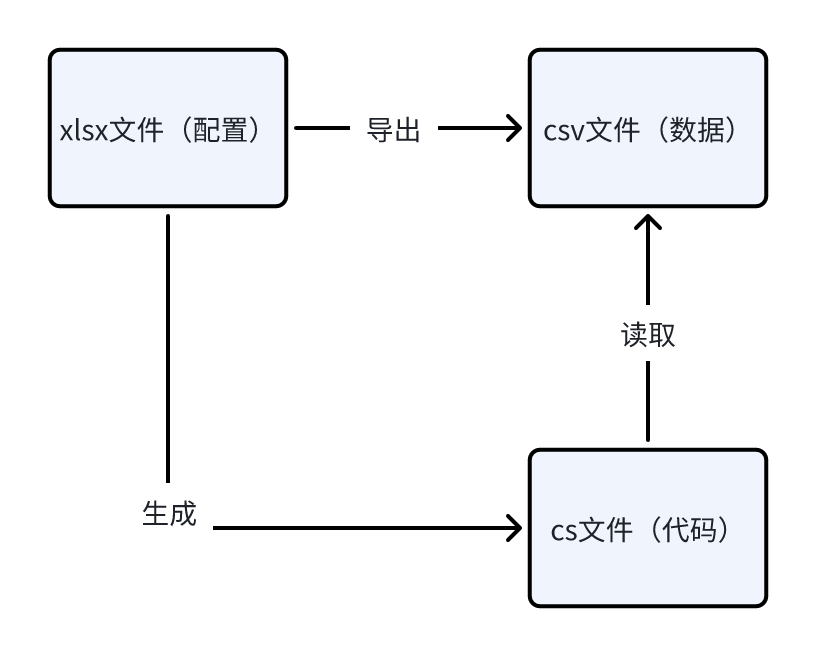
导表流程如图所示
技术选型
上回书说到通过partial class、attribute,使用源代码生成器,以朴素的字符串处理的方式,在现有代码的基础上生成代码。
这回考虑如下情景:不一定存在一个C# partial class供Roslyn编译器进行语法分析,不再通过attribute(而是通过表头)为代码生成提供元数据,也不想再搞字符串拼接这种难以维护的写法。
这样一来,比起源代码生成器,可能模板代码更合适。
那么为什么不选择可以通过C#编写的T4 Template、Scriban,而选择了Go的text/template呢?因为这回我们用的引擎是Godot(
顺带一提Godot4.x作为一个支持.NET8的引擎,源代码生成器的使用不像在Unity那样受到诸多限制,可以直接通过创建.NET8类库项目启动源生。
此外,golang作为一个编译型语言,打出来的包体可以独立运行,不像python那样需要配置目标环境,对于一个不止需要程序参与的项目有着得天独厚的优势。
分析
代码结构
CSV.g.cs大致结构如下:
- 部分类CSV
- 根据表格名称生成的部分类
- 根据表头信息生成的属性
- 构造函数用于从csv数据构建实例
- 静态的构造函数与Load方法用于加载数据
- 静态的List、Dictionary与Get方法用于存储与获取实例
- 静态方法LoadAll
- 调用上述每个类的Load方法,一次性加载所有数据
- 根据表格名称生成的部分类
数据准备
必要的数据有:
- 表格名称、属性、xlsx导出csv文件的路径
- 属性的类型、标识符名称
写成结构体长这样:
type Field struct {
    Type       string
    Identifier string
}

type Xlsx struct {
    Name   string
    Path   string // Godot加载csv的路径
    Fields []Field
}
只需遍历所有xlsx文件,得到一个[]Xlsx,接下来就是模板的事情了!
模板的语法就不在此赘述了,可以参考GO语言文档,直接进入编写环节吧!
编写
首先是写死的引用、命名空间和大类:
// 这份文件通过xlsx生成,请务必不要更改!!!!!

using Godot;
using System.Linq;
using System.Collections.Generic;

namespace Franken;

public partial class CSV
{
}
然后是CSV类中的LoadAll方法,它需要遍历传入的[]Xlsx:
public static void LoadAll()
{
    {{- range .}}
    {{.Name}}.Load();
    {{- end}}
}
接下来是根据每个xlsx文件生成对应的类:
{{- range .}}
public partial class {{.Name}}
{
}
{{- end}}
可以通过这一层遍历出的东西包括Load方法、静态构造函数与包含全部该类实例的List:
static {{.Name}}() => Load();

public static List<{{.Name}}> Data { get; private set; }

public static void Load()
{
    if (Data != null) return;
    Data = [];
    using var fa = FileAccess.Open("{{.Path}}", FileAccess.ModeFlags.Read);
    while (!fa.EofReached()) {
        var tokens = fa.GetCsvLine("\t");
        if (tokens.All(string.IsNullOrEmpty)) continue;
        Data.Add(new(tokens));
    }
    dict = Data.ToDictionary(data => data.{{- range .Fields}}{{.Identifier}}{{- break}}{{- end}});
}
表格中每一列的信息对应类型中一个属性:
{{- range .Fields}}
public {{.Type}} {{.Identifier}} { get; set; }
{{- end}}
这些属性通过在私有构造函数中解析字符串来赋值:
private {{.Name}}(string[] data)
{
    {{- range $index, $field := .Fields}}
    {{- if eq $field.Type "string"}}
    {{$field.Identifier}} = Util.GetString(data[{{$index}}]);
    {{- else if eq $field.Type "int"}}
    {{$field.Identifier}} = Util.GetInt(data[{{$index}}]);
    {{- else if eq $field.Type "float"}}
    {{$field.Identifier}} = Util.GetFloat(data[{{$index}}]);
    {{- else if HasPrefix $field.Type "List"}}
    {{$field.Identifier}} = Util.Get{{$field.Type}}(data[{{$index}}]);
    {{- else}}
    {{$field.Identifier}} = Util.GetEnum<{{$field.Type}}>(data[{{$index}}]);
    {{- end}}
    {{- end}}
}
为了便于查询,我们规定表格的第一列为主键,定义一个字典与Get方法:
private static Dictionary<{{- range .Fields}}{{.Type}}{{- break}}{{- end}}, {{.Name}}> dict;
public static {{.Name}} Get({{- range .Fields}}{{.Type}}{{- break}}{{- end}} key) =>
    dict.TryGetValue(key, out var value) ? value : null;
最终得到如下模板:
// 这份文件通过xlsx生成,请务必不要更改!!!!!

using Godot;
using System.Linq;
using System.Collections.Generic;

namespace Franken;

public partial class CSV
{
    public static void LoadAll()
    {
        {{- range .}}
        {{.Name}}.Load();
        {{- end}}
    }
    {{- println}}
    {{- range .}}
    public partial class {{.Name}}
    {
        static {{.Name}}() => Load();

        public static List<{{.Name}}> Data { get; private set; }

        private static Dictionary<{{- range .Fields}}{{.Type}}{{- break}}{{- end}}, {{.Name}}> dict;
        public static {{.Name}} Get({{- range .Fields}}{{.Type}}{{- break}}{{- end}} key) =>
            dict.TryGetValue(key, out var value) ? value : null;

        private {{.Name}}(string[] data)
        {
            {{- range $index, $field := .Fields}}
            {{- if eq $field.Type "string"}}
            {{$field.Identifier}} = Util.GetString(data[{{$index}}]);
            {{- else if eq $field.Type "int"}}
            {{$field.Identifier}} = Util.GetInt(data[{{$index}}]);
            {{- else if eq $field.Type "float"}}
            {{$field.Identifier}} = Util.GetFloat(data[{{$index}}]);
            {{- else if HasPrefix $field.Type "List"}}
            {{$field.Identifier}} = Util.Get{{$field.Type}}(data[{{$index}}]);
            {{- else}}
            {{$field.Identifier}} = Util.GetEnum<{{$field.Type}}>(data[{{$index}}]);
            {{- end}}
            {{- end}}
        }
        {{- println}}
        {{- range .Fields}}
        public {{.Type}} {{.Identifier}} { get; set; }
        {{- end}}

        public static void Load()
        {
            if (Data != null) return;
            Data = [];
            using var fa = FileAccess.Open("{{.Path}}", FileAccess.ModeFlags.Read);
            while (!fa.EofReached())
            {
                var tokens = fa.GetCsvLine("\t");
                if (tokens.All(string.IsNullOrEmpty)) continue;
                Data.Add(new(tokens));
            }
            dict = Data.ToDictionary(data => data.{{- range .Fields}}{{.Identifier}}{{- break}}{{- end}});
        }
    }
    {{- println}}
    {{- end}}
}
golang我本身没太掌握,这里只涉及一些文件读写,包括数据准备与代码生成阶段,就不特别展示了……
参考
https://www.topgoer.com/%E5%B8%B8%E7%94%A8%E6%A0%87%E5%87%86%E5%BA%93/template.html